

Settings — Configuration
Navigate to: Settings > Configuration tab (Admin and Editor roles)
This tab lets you manage the configurable dropdown options used throughout FlowQMS. Instead of hardcoding values, FlowQMS uses configurable categories so you can customize the system to match your organization's terminology.
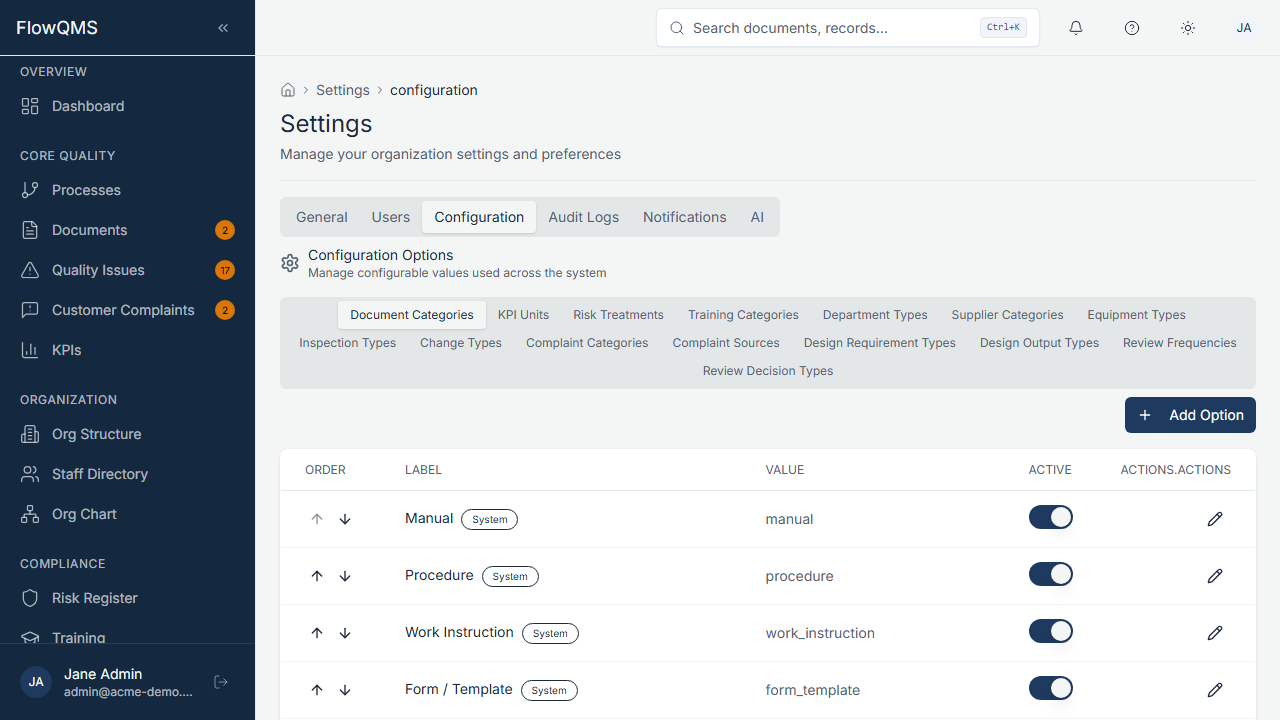
Manage dropdown options for all modules from a central configuration panel.
How Configuration Works
Each configurable category represents a set of dropdown options used in forms. For example:
| Category | Used In |
|---|---|
| Document Category | Document creation form — Category field |
| NCR Type | Quality Issue form — Type field |
| Supplier Category | Supplier form — Category field |
| Equipment Type | Equipment form — Type field |
| Inspection Type | Inspection Plan form — Type field |
| Change Type | Change Request form — Type field |
| Training Category | Course form — Category field |
| Risk Treatment | Risk form — Treatment field |
| KPI Unit | KPI Definition form — Unit field |
| Complaint Source | Complaint form — Source field |
| Complaint Category | Complaint form — Category field |
| Review Frequency | Management Review form — Frequency field |
| Department Type | Department form — Type field |
Managing Config Options
- Select a category from the left panel
- The right panel shows all options in that category as a table
- Each option has:
| Field | Description |
|---|---|
| Label | Display text shown to users in dropdowns |
| Value | Internal value stored in the database |
| Is Active | Toggle to enable/disable this option |
| Display Order | Number controlling the order in dropdowns |
- Click "Add Option" to create a new option for the selected category
- Click on an existing option to edit it
- Toggle "Is Active" off to hide an option from dropdowns without deleting it