

Supplier Management
The Supplier Management module maintains your approved supplier list, tracks supplier evaluations, and links supplier issues to quality records.
Sidebar location: Operations > Suppliers
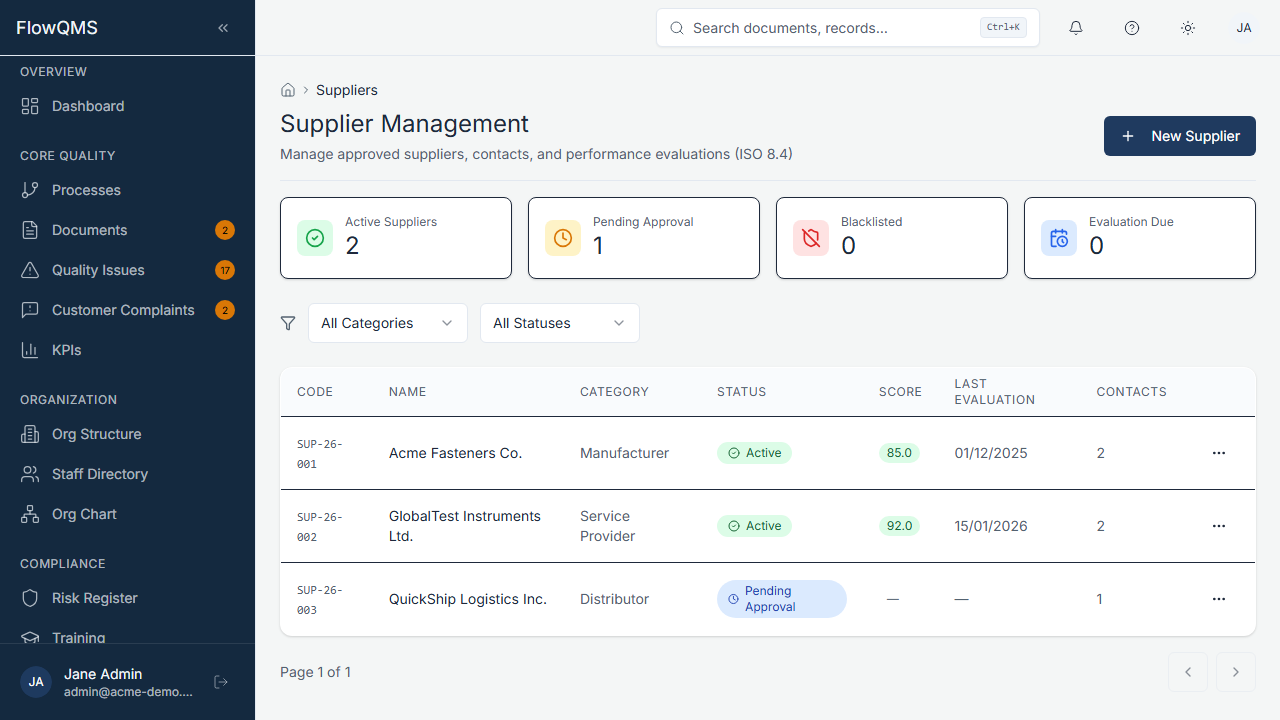
Browse your approved supplier list with status, category, and contact information.
Supplier List
A data table with columns for name, category, status, contact info, country, and actions.
Creating a New Supplier
- Click "New Supplier"
- Fill in the form:
| Field | Description | Required |
|---|---|---|
| Name | Supplier company name | Yes |
| Category | Supplier classification (configurable: e.g., Material, Service, Equipment) | No |
| Status | Pending Approval, Approved, Rejected, or Inactive | No |
| Supplier contact email | No | |
| Phone | Supplier phone number | No |
| Website | Supplier website URL | No |
| Address | Physical address | No |
| Country | Country of operation | No |
| Tax ID | Tax identification number | No |
| Notes | General notes about this supplier | No |
| Approved Date | Date the supplier was approved (auto-set on approval) | No |
- Click "Create" to save
Supplier Detail Page
| Tab | Content |
|---|---|
| Overview | Basic supplier information and approval status |
| Contacts | Contact persons at the supplier — each with name, role (procurement, quality, technical), email, and phone |
| Evaluations | Supplier performance scorecards. Rate suppliers on quality, delivery, cost, and responsiveness. View evaluation history and trends. |
| Attachments | Quality agreements, certifications, ISO certificates, audit reports |
| Linked NCRs | All NCRs that reference this supplier (supplier-sourced issues, SCARs) |
| Audit Trail | Complete change history |
Supplier Evaluation
To evaluate a supplier:
- Go to the supplier's Evaluations tab
- Click "Add Evaluation"
- Score the supplier on each dimension (quality, delivery, cost, responsiveness)
- Add notes and evaluation date
- The overall score is calculated and displayed