

Risk Register
The Risk Register module helps you identify, assess, and manage risks and opportunities in alignment with ISO 9001:2015 risk-based thinking requirements.
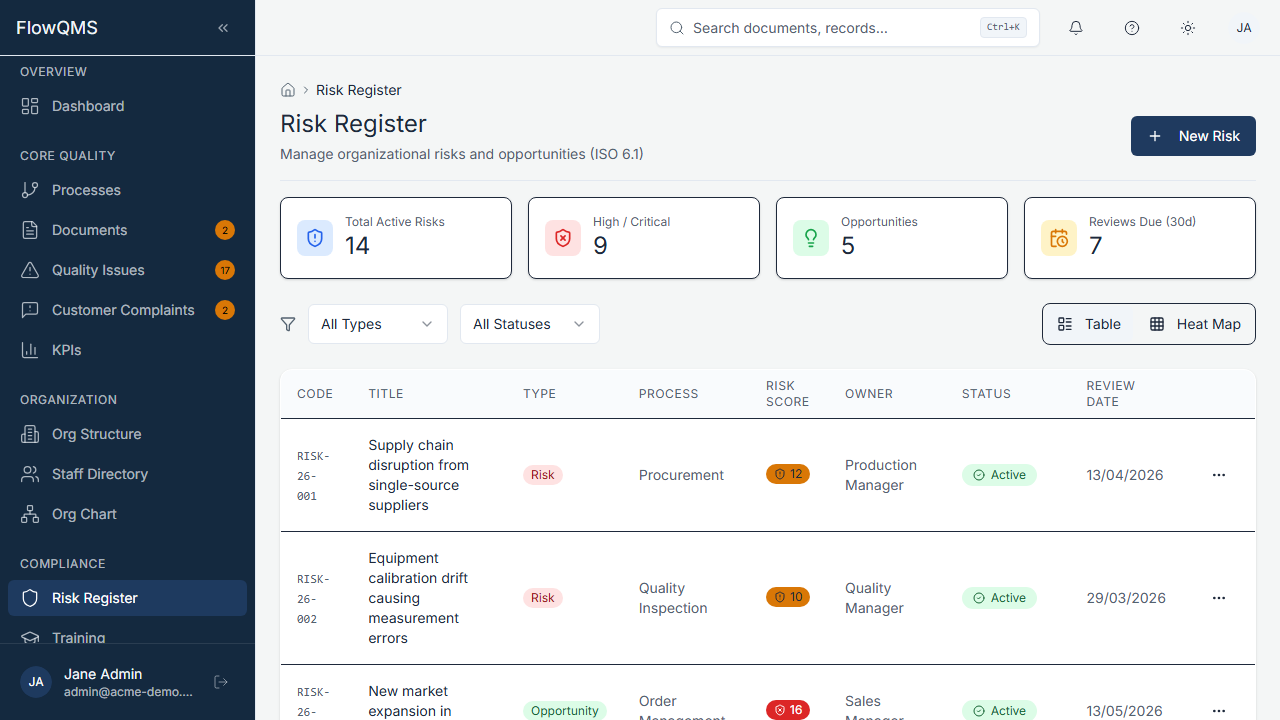
Sidebar location: Compliance > Risk Register
Risk List
A data table listing all risks and opportunities with columns for title, type (Risk/Opportunity), impact, likelihood, risk score, status, and owner.
Risk Heat Map
Above or alongside the list, a visual heat map displays all risks on a 5x5 matrix:
- X-axis: Likelihood (1 = Rare, 5 = Almost Certain)
- Y-axis: Impact (1 = Negligible, 5 = Catastrophic)
- Color zones: Green (low risk), Yellow (medium), Orange (high), Red (critical)
- Each risk appears as a dot on the matrix at its assessed position
Creating a New Risk
- Click "New Risk"
- Fill in the form:
Core Information:
| Field | Description | Required |
|---|---|---|
| Title | Risk or opportunity name (max 200 characters) | Yes |
| Type | Risk or Opportunity | Yes |
| Status | Draft, Active, Mitigated, or Closed | Yes |
| Description | Detailed description of the risk/opportunity (AI assist available) | No |
Risk Assessment:
| Field | Description | Required |
|---|---|---|
| Impact | Severity if the risk materializes (scale 1-5) | Yes |
| Likelihood | Probability of occurrence (scale 1-5) | Yes |
| Risk Score | Automatically calculated: Impact x Likelihood (displayed in real-time as you adjust the sliders) | Auto |
Impact scale:
- 1 = Negligible
- 2 = Minor
- 3 = Moderate
- 4 = Major
- 5 = Catastrophic
Likelihood scale:
- 1 = Rare
- 2 = Unlikely
- 3 = Possible
- 4 = Likely
- 5 = Almost Certain
Treatment & Planning:
| Field | Description | Required |
|---|---|---|
| Treatment | How you will address this risk: Accept, Mitigate, Avoid, Transfer, or Monitor (configurable) | No |
| Action Plan | Detailed actions to treat the risk | No |
Ownership & Compliance:
| Field | Description | Required |
|---|---|---|
| Process | Link to the affected process | No |
| Owner Role | Job role responsible for managing this risk | No |
| ISO Clause | Related ISO 9001 clause (e.g., "6.1") | No |
| Review Date | Next scheduled review date | No |
- Click "Create Risk" to save
ISO 9001 Reference
Clause 6.1 requires organizations to determine risks and opportunities that need to be addressed to give assurance that the QMS can achieve its intended results, enhance desirable effects, prevent or reduce undesired effects, and achieve improvement.
Risk Detail Page
| Tab | Content |
|---|---|
| Overview | Risk assessment summary, treatment strategy, owner, linked process |
| Evaluation History | Log of all risk score changes over time (re-evaluations) |
| Actions | Specific mitigation tasks and their status |
| Audit Trail | Field-level change history |
Re-evaluating a Risk
Risks should be periodically re-evaluated. To record a new evaluation:
- Open the risk detail page
- Go to the Evaluation History tab
- Add a new evaluation with updated Impact and Likelihood scores
- The risk score and heat map position update accordingly