

Inspections
The Inspections module manages inspection plans with defined acceptance criteria, supports performing inspections, and tracks pass/fail trends.
Sidebar location: Operations > Inspections
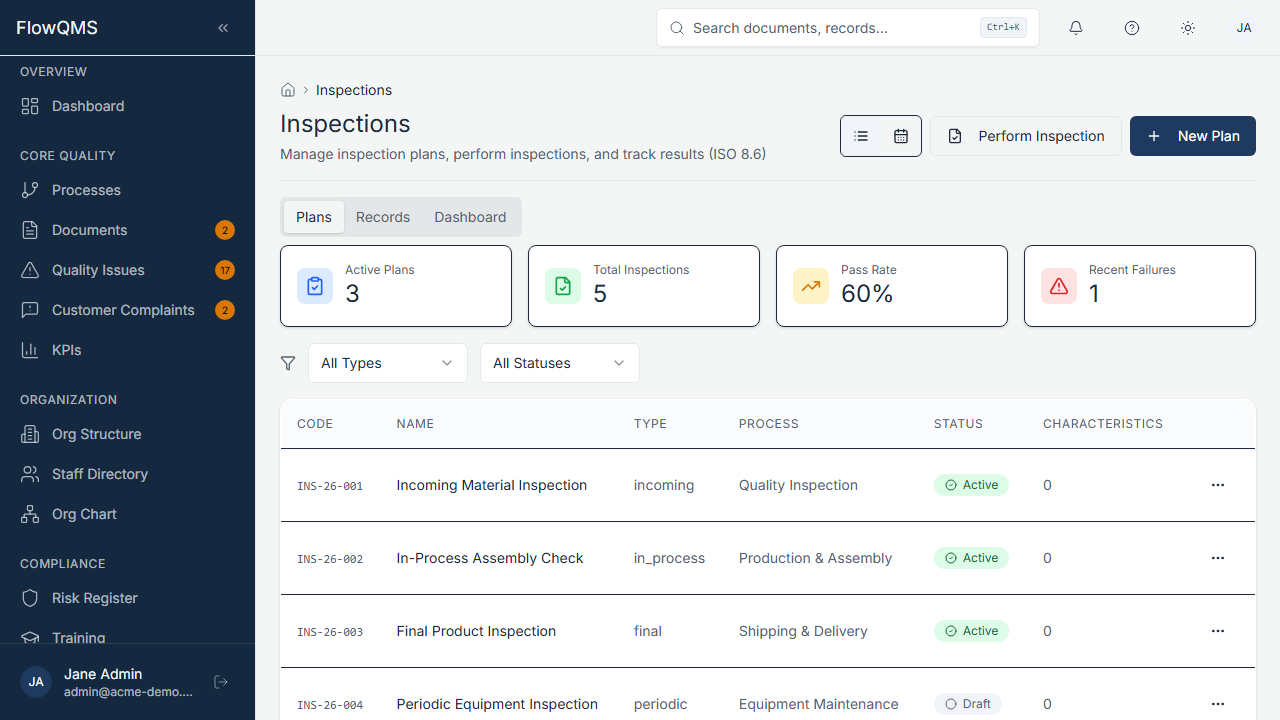
Browse all inspection plans with type, status, and linked processes.
Inspection Plan List
A data table showing all inspection plans with columns for name, type, status, linked process/equipment, and schedule.
Creating an Inspection Plan
- Click "New Inspection Plan"
- Fill in the form:
| Field | Description | Required |
|---|---|---|
| Name | Inspection plan name (e.g., "Incoming Material Inspection") | Yes |
| Type | Inspection type (configurable: e.g., Incoming, In-Process, Final) | No |
| Status | Draft, Active, Inactive, or Archived | No |
| Description | What this inspection covers (AI assist available) | No |
| Process | Link to the related process | No |
| Department | Department responsible for inspections | No |
| Equipment | Equipment used during inspection | No |
| Supplier | Supplier being inspected (for incoming inspections) | No |
- Click "Create" to save
Inspection Plan Detail Page
| Tab | Content |
|---|---|
| Overview | Plan scope, target, frequency |
| Characteristics | List of inspection characteristics — each defines what to check, the acceptance criteria, and the type of measurement. Add, edit, or remove characteristics. |
| Records | Individual inspection execution records (each time the inspection was performed) |
| Calendar | Visual calendar of scheduled inspections |
| Dashboard | Pass/fail rates, trend analysis charts, defect tracking |
| Audit Trail | Complete change history |
Performing an Inspection
- Open the inspection plan detail page
- Click "Perform Inspection"
- A modal dialog appears with all characteristics from the plan
- For each characteristic:
- Record the Result (Pass, Fail, or Conditional)
- Add Notes (observations, deviations)
- Upload Evidence (photos, test results)
- Submit the inspection record
Inspection records are saved and appear in the Records tab with date, inspector, and overall pass/fail status.